
Steps Required to Change a Profile Stage
During the enrolment journey we often ask parents to complete steps is a set sequence. For example, completing a pre-interview questionnaire before booking an interview.
EnrolHQ has made this a process that can be automated so that when a parent completes a Custom Form an Automation can be triggered to change the Stage on the Student's Profile.
Workflow Example
The Custom Form "Pre-Interview Questionnaire" is sent to profiles in Stage Awaiting Interview.
The parent completes Pre-Interview Questionnaire which triggers an Automation to move the Profile from Awaiting Interview to Interview.
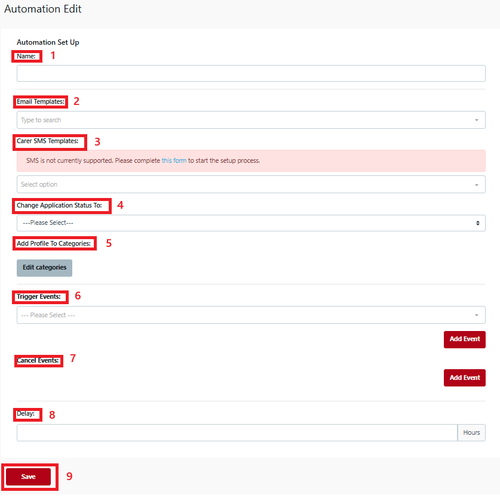
- Name - Automation name such as ‘Custom form for action/review’ that makes it easy to identify. The name is for internal use only.
- Email Template - Not applicable. In this example we are not sending an email to parents or staff.
- Carer SMS - Not applicable.
- Change Application Stage To - Select the Enrolment Journey Stage to which this Automation will move the Student Profile. In this example we want to select Interview.
- Add to Student Profile Category - Settings can included to add a Student Profile Category to the Student's Profile using the Automation process. It is not required in this example.
- Trigger Event - Select ‘Custom Form Submitted’ > Custom Form - Select the Custom Form that will be submitted.
- Cancel Event - not applicable in this example.
- Delay - Set at 0 hours. This means the automation will occur immediately upon the Custom Form being submitted.
- Save
In the article Emails and Automations all the various capabilities are explained.