
How to use bulk actions to move a group of students up or down a year and year level to adjust for enrolment start dates in the beginning of a new year.
Roll Up and Roll Down Students
EnrolHQ’s Roll Up or Roll Down function assists keeping your records up to date with the most current enrolment information. It allows schools to move a group of waitlisted Profiles to a different year with a few clicks.
For example, if a group of waitlisted students are in Year 7 2026 and need to move to Year 8 2027, this function easily allows staff to make the change.
Note: This feature is most useful when a new school year begins.
The function is also applicable if a school needs to move a group of students back down a year by using the Roll Down option.
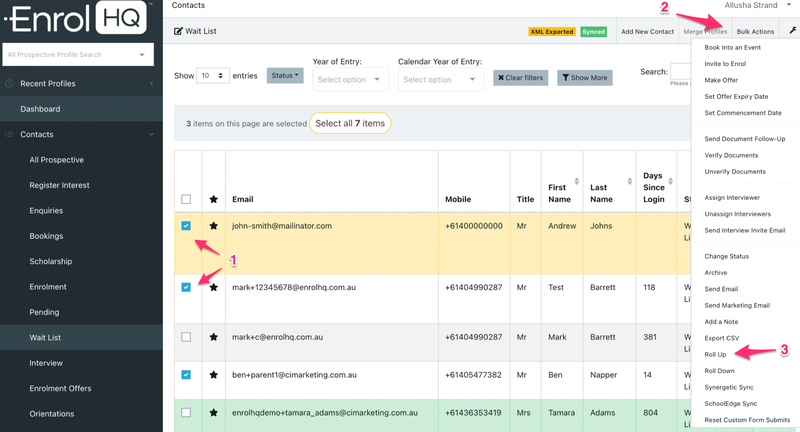
Both Roll Up and Roll Down can be used as Bulk Actions by selecting multiple profiles at once and then navigating to Bulk Actions > Roll Up or Roll Down.
- Contacts > All Prospective > Select students
- Bulk Actions > Roll Up or Roll Down
Please note Roll up and Down function does not affect any Alternate Year's of Entry.