
Seek on how parents accept an offer
How Parents Accept an Enrolment Offer
It is important to remember that the Enrolment Dashboard is only available to the User Parent. The second (Non-user) parent is asked to review the terms of enrolment and sign their acceptance using a link. They do not have access to any information the user parent has filled in except their contact details (email, mobile phone). The process of accepting the enrolment offer takes the following steps:
- Parent 1 (User Parent) logs into the Enrolment Dashboard with his or her email address, selects Accept Enrolment Offer and continues with Click to Send Email to Parent 2 (Non-user Parent)].
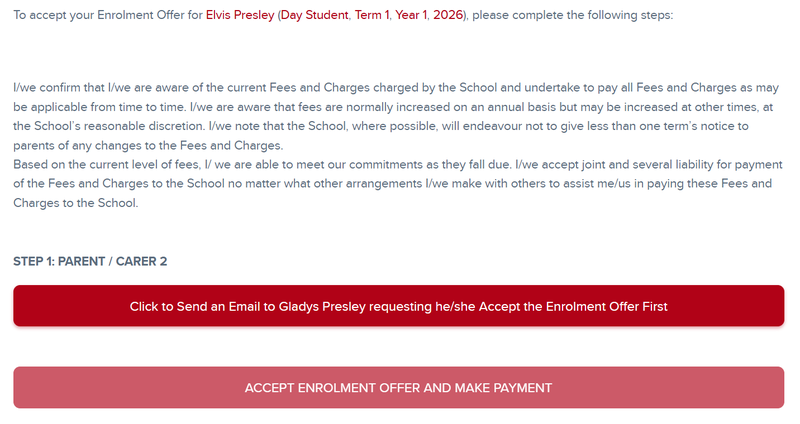
- This triggers an email to the second parent with a link to access the offer. The second parent has to verify their identity by their email address, last name and their child's date of birth before they can access the terms and conditions of the offer and sign their acceptance. If the enrolment offer fee has been split, the second parent will be required to make payment of their share to complete acceptance.


- Parent 1 (User Parent) now receives an email asking them to log back into their Enrolment Dashboard using his or her email address to complete the process. Upon logging in, they can see the steps taken by the second (non-user) parent and follow the same steps before making payment of the enrolment offer fee.


Troubleshooting
While talking to the parent, staff can “Log in as Parent” or use the Secondary Parent Acceptance link in the Enrolment Offer tab to see the links and steps that either Parent 1 or Parent 2 is seeing and following.
- Check the Parent 1 and 2 emails and contact numbers are correct
- Check is the applicant’s date of birth
- Check the second parent's last name
If these are all correct it is time to raise a support case to support@enrolhq.com.au