
Verifying Parent Login Access no 2FA being received
We support international phone numbers, but sometimes international providers don't allow us to send the SMS to them.
To address this issue:
- Click on 'Login Actions'
- Select 'Disable SMS verification'
- Click 'Disable'

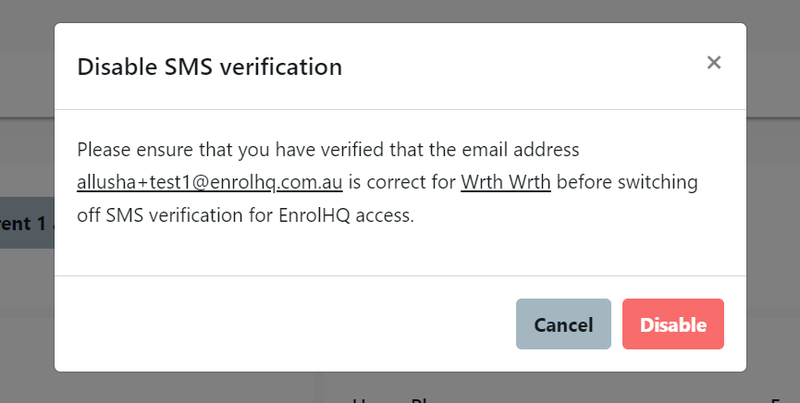
This will allow to only send the verification link via parent's email to gain access to their enrolment dashboard.
It should be noted that the option to "Disable SMS Verification" is no longer available once the parents account has been verified.
Updated Primary Parent unable to receive SMS for 2FA verification
Sometime the provider of the SMS serivce is unable to communicate with mobile numbers from international providers.
For existing users (If the Primary parent has been swapped between the 2 carers the new primary carer can also experience this issue) there is a different option to disable the 2FA.
Go to the Student Profile
Select the Primary Carer
Go to the contact Details
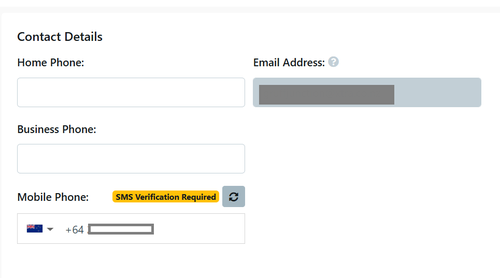
select the
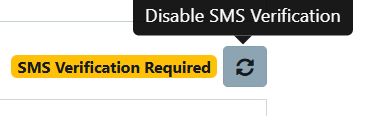
This will allow the parent to skip the mobile number verification and go straight to the OTP login via email.