
Read about how EnrolHQ manages enrolments from initial enquiry through to offer acceptance and commencement.
The Enrolment Stages
On the main menu you will see that the the Contacts menu expands out to have shortcuts to predefined Stages. These are the different Stages that Student Profiles are expected to go through as they progress through the enrolment process. The Enrolment Journey Stage descriptions are configured by each school in
- Settings > Enrolment Journey Stages
Enrolment Journey Stages may look something like this:
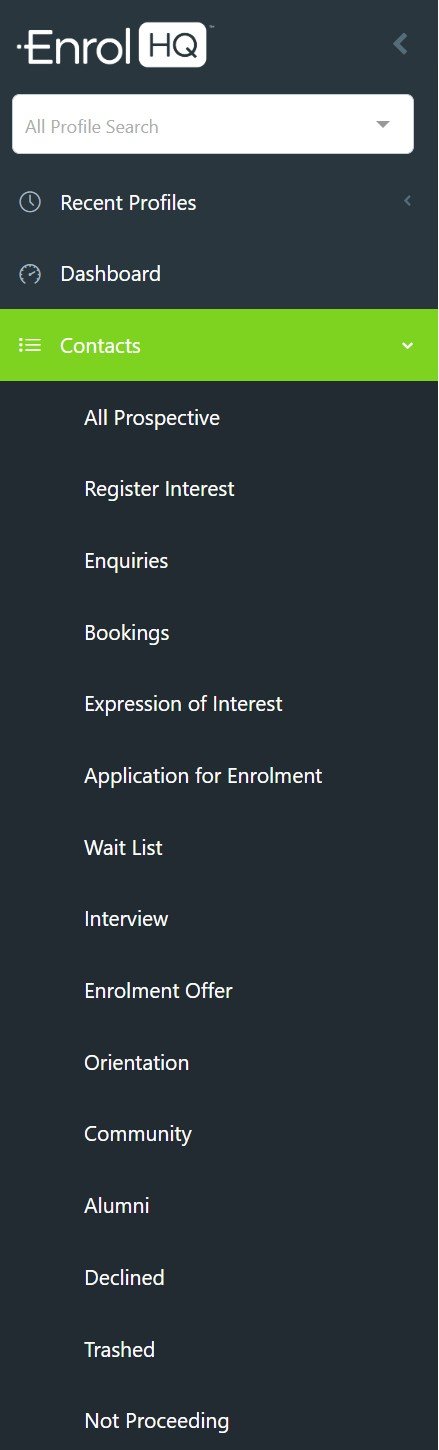
- All Prospective - includes all Student Profiles with the exception of ‘Declined’ and ‘Cancelled’.
- Register Interest - will filter for Student Profiles where parents have only entered their details via the ‘Register Your Interest’ form.
- Enquiries - will filter for Student Profiles where parents have filled out an ‘Enquiry Form’
- Bookings - will filter for Student Profiles where parents have made an event booking to a school event setup inside EnrolHQ
- Expressions of Interest or Scholarship - will filter for Student Profiles where parents have filled out an ‘Expression of Interest’ or 'Scholarship' form
- Application for Enrolment - will filter Student Profiles where an enrolment application form has been started
- Wait List - as the name suggests - we help you prioritise the order of those waiting for a position.
- Interview - filters for students that need to book and complete an interview with the school
- Enrolment Offer - shows all students who have received an offer of place
- Orientation - will filter for Student Profiles where parents have accepted an “Offer of Enrolment” but are still waiting for their child to commence
- Community - will filter for Student Profiles where the students have commenced attending your school
- Alumni - will filter for Student Profiles where the students have graduated.
- Declined - will filter for Student Profiles where either the school or the parents have explicitly declined to continue with the enrolment at any point. They are placed here for record keeping and statistical purposes.
- Trashed - will filter for Student Profiles that have been archived due to clerical errors such as being a duplicate record, spurious data being entered etc. Records are placed here so they do not affect record keeping and statistical purposes.
- Not Proceeding - will filter for Student Profiles that have been moved into this Stage because they have decided not to proceed to interview or offer. They are placed here for conversion data reporting.
No student profile ever moves ‘backwards’ as they progress through their Enrolment Journey Stages from Register Your Interest to Orientation. For example, if a parent fills out an enrolment form and then books a school tour afterwards or posts an enquiry, they are still considered to be in the Application for Enrolment Stage because that is the most advanced Stage they have reached.
Keep in mind if you have existing data you can import this into EnrolHQ in any Stage (or add individually families manually)
The Enrolment Process
The train analogy is used to highlight the features of the EnrolHQ solution. In a typical school, the enrolment process is made up of many tools and supported by various different 'vehicles' (e.g spreadsheets, web forms, paper forms, letters). It is hard to manage the data and process as parents move from one 'vehicle' to the next.
In comparison, getting on the EnrolHQ train is simple. All parents stay on the train and remain with their data for the whole trip. If they get off or get stuck, we know exactly what to do.There are five carriages to the EnrolHQ train.
The first carriage (Discovery) is where parents request a prospectus, ask a question or visit the school. Using our admin toolbox, a registrar will prompt parents to move along to the next carriage (Enrolment) and submit an Expression of Interest form or full Enrolment Application. At this point, we also normally collect payment. The third carriage (Acceptance) is where the review, interview, offer and all-important acceptance by one or both parents are made. The business intelligence carriage (Reports and Export) handles reporting, forecasting, full data export via API and integrations to other School Management Systems. Our final carriage is called (Onboarding). This carriage collects all the information from parents via custom forms after they accept their place but before they start at your school.