
An explanation of what system emails are and how they work - with some examples.
System Emails Explained
In the main navigation menu, you will find an ‘Email Settings’ button which will let you go to Templates.
There is a large library of built-in email templates and you will see that at each stage of enrolment i.e Enquiry, Booking, EOI, Enrolment, there are built in templates for staff and to parents.
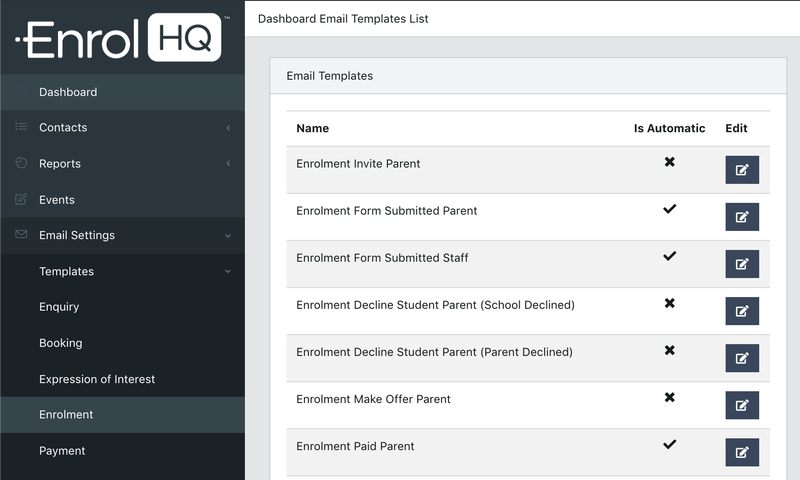
You will also see ticks and crosses in the ‘Is Automatic’ column. This shows you which emails are sent automatically (due to a parent completing a task/submitting a form) and which ones are not and need to be initiated by staff.
Non-Automatic emails include making offers, declining students, inviting to enrol. These are sent if and only if a staff member takes that action.
Emails that are sent to staff have ‘Staff’ at the end of the name. They are notification emails that are sent to the school admissions email address to say, for example, an EOI has come in or an Enrolment has come in.
For example:
- Enquiry Parent is the email that is automatically sent to parents when they submit an Enquiry Form.
- Enquiry Staff is the notification email that is automatically sent to school staff when a parent submits an Enquiry Form
There are system templates for emails to be sent out to parents and staff when Parents:
- Submit an Enquiry Form
- Book an Event/School Tour (it might contain information about parking etc)
- Submit an Expression of Interest Form
- Submit an Enrolment Application Form
- Book an Interview
- Complete the Acceptance of Offer Workflow
- Make an Online Payment (this is the Receipt)
There are system templates for emails that are sent when Staff initiate an action:
- Enrolments > Invite Parent (to start an enrolment application form)
- Enrolments > Request Documents (an email to ask parents to re-upload documents)
- Enrolments > Request 2nd parent signature (an email asking for the second parent signature for split families)
- Enrolments > Decline by Staff (an email to let the parents know the school is full and will not be proceeding with the enrolment for their son/daughter)
- Enrolments > Decline by Parent (an email to let the parents know the school has received their notice to withdraw the application and wish the child the best)
- Enrolments > Make Offer Parent (an email to make an offer of enrolment to a family)
- Interview > Interview Invite Parent (an email to invite parents to schedule an interview with the school)
For all other emails, you will need to create a ‘Custom Template’. A custom template is an email that you can send at any time by filtering for a recipient group and using "Commslog" or "Bulk Action" to send an email.
Custom Templates can also be sent automatically based on Automated Email Triggers.