How to use the enrolment stages to do basic filtering of your students.
Enrolment Stages and Menu Shortcuts
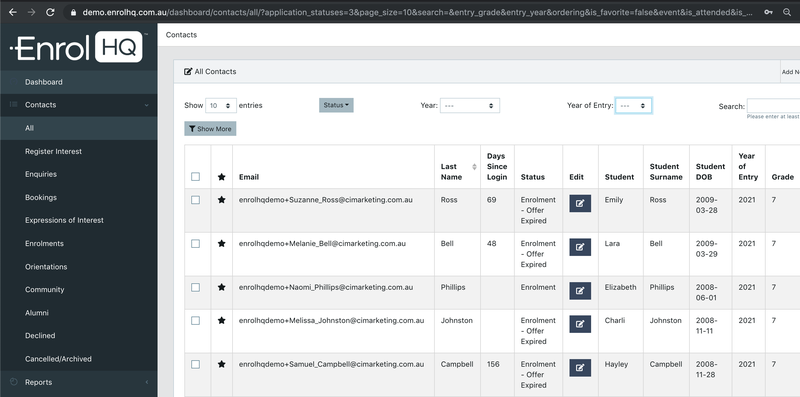
On the main menu (left side) underneath the Contacts menu item, you will see that it expands out to have shortcuts to predefined filters. These are the different stages that Student Profiles are expected to go through as they progress through the enrolment process. Please note that your Enrolment Journey Stages may be renamed to match your school's processes.
- All Prospective - includes all Student Profiles with the exception of ‘Declined’, Trashed' and ‘Not Proceeding’.
- Register Interest - will filter for Student Profiles where parents have only entered their details via the ‘Register Your Interest’ form.
- Enquiries - will filter for Student Profiles where parents have filled out an ‘Enquiry Form’.
- Bookings - will filter for Student Profiles where parents have made an event booking to a school event setup inside EnrolHQ.
- Expressions of Interest or Scholarship - will filter for Student Profiles where parents have filled out an ‘Expression of Interest’ form or 'Scholarship' form.
- Waitlist - As the name suggests - we help you prioritise the order of those waiting for a position.
- Enrolments - will filter for Student Profiles where parents have filled out an ‘Enrolment Application Form’.
- Interview - filters for students that need to book and complete an interview with the school.
- Offer - shows all students who have received an offer of place.
- Orientation - will filter for Student Profiles where parents have accepted an “Offer of Enrolment”.
- Community - will filter for Student Profiles where the students are currently attending your school.
- Alumni - will filter for Student Profiles who have graduated.
- Declined - will filter for Student Profiles where either the school has declined to make an offer of enrolment or the parents have explicitly declined to continue with the enrolment after interview. They are placed here for record keeping and statistical purposes.
- Trashed - will filter for Student Profiles that have been archived due to clerical errors such as being a duplicate record, spurious data being entered etc. Records are placed here so they do not affect record keeping and statistical purposes.
- Not Proceeding - will only show students that have declined to continue their application with the school before an offer of enrolment.
No Student Profile ever moves backwards in their enrolment stages from Register Interest to Orientation. If a parent fills out an enrolment form and then books a school tour afterwards or makes an enquiry, they are still considered to be in the ‘Enrolments’ stage inside EnrolHQ because that is the most advanced stage they have reached.
EnrolHQ CRM
The Contacts tab is your CRM (Contact Relationship Management) overview.
You can reach your EnrolHQ CRM by logging in to your staff dashboard and clicking on Contacts > All Prospective on the main dashboard menu.
The future students’ CRM is the heart of EnrolHQ. Every single form that’s filled out by a prospective parent whether it be ‘Register Your Interest’, ‘Enquiry’, ‘Event Booking’ or ‘Enrolment Form’ will create or update a future Student Profile (with parent details attached) in your CRM. It is the one place where you manage all of your future families to guide them through your school's full enrolment process. The number of columns displayed can be altered by using the spanner icon on the top right hand corner of the Menu.

A list of columns to display can be turned on or off here. (Note: this is profile based so your selection will not affect another user)